







Does Health App Count Steps on Treadmill?
You’ve undoubtedly used your iPhone’s Health app to monitor your daily steps to stay active. Indoor activities like treadmill walking or running may make you question whether the Health app counts steps. Not as easy as you think. In this article, we’ll discuss step tracking, whether the Health app works on treadmills, and how to get the most accurate statistics.
1. How the Health App Tracks Steps
It is essential to have a solid understanding of the process by which the Health app gathers step data before delving into treadmill-specific monitoring first.
It is the Health app that takes use of
- Motion sensors are already included into the iPhone.
- Sensors for the Apple Watch (if they are manufactured and available).
- Personal fitness devices or software developed by third parties that are related
Accelerometers and gyroscopes are used in order to identify patterns of movement that are similar to those of walking or running. While you are indoors, for example, the program will continue to record your steps even if you are unable to access your GPS data.
In principle, the answer to the question “does a health app count steps on a treadmill” is yes; however, there is more to the answer than that.
2. Walking on a Treadmill with an iPhone
First, let’s begin with the most basic configuration: walking on a treadmill while holding your iPhone over your shoulder.
Will It Count Steps?
Yes, it will. As long as your iPhone is
In your pocket
Held in your hand
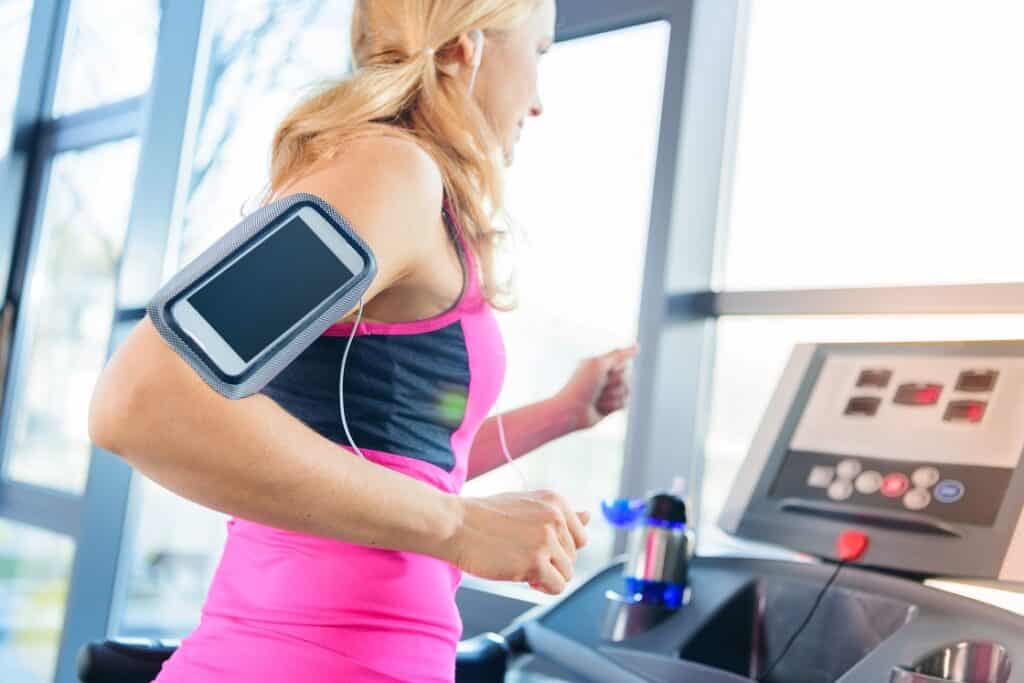
Worn in an armband
…the Health app will record the motion of your body and convert that into step data. However, there’s a catch: since you’re not changing physical location (as you would outdoors), the app can’t track distance accurately without GPS input.
Limitations
No GPS movement = potential distance inaccuracies
Poor placement (e.g., on the treadmill console) may not register motion
So while the step count might be recorded, distance and calories might not be as precise without additional devices or calibration.
3. Using Apple Watch on a Treadmill
If you’re using an Apple Watch, you’re in luck. The Apple Watch is far more accurate in tracking treadmill activity than the iPhone alone.
How It Works
The watch uses
- Your wrist movement
- Your stride length (which it learns over time)
- Heart rate and motion sensors
These inputs make the Apple Watch much more effective at capturing both steps and distance when treadmill walking or running.
Calibrating Your Apple Watch
For the best accuracy, you should calibrate your Apple Watch:
Take a 20-minute walk or run outdoors with your iPhone and Apple Watch.
This helps your watch learn your unique stride length, which improves indoor tracking significantly.
Once calibrated, the Apple Watch is very reliable for treadmill workouts. So again, does health app count steps on treadmill? Yes—especially with an Apple Watch.
4. What About Health App + Third-Party Treadmill Apps?
Another method that is gaining popularity is synchronizing your activities on the treadmill with the Health app by using third-party platforms such as
- Apple GymKit
- MyFitnessPal
- Strava
- Fitbit (with third-party sync tools)
- Runkeeper
- Nike Run Club
Apple GymKit
Treadmills that are equipped with the GymKit feature enable users to immediately sync their data by just tapping their Apple Watch on the treadmill. This is a transfer of:
- Steps
- Distance
- Calories
- Heart rate
…directly into the Health app, with little room for error.
If your treadmill doesn’t have GymKit, look into whether it supports app syncing via Bluetooth or Wi-Fi. Many modern treadmills offer this.
5. Why Step Tracking on Treadmills Matters
It’s possible that you’re asking why you just don’t just measure calories or time. Why is it vital to take steps?
Step counting may help you stay motivated and on track for the following reasons, even while you are using a treadmill:
Goal Setting
There are a lot of individuals that try to walk 10,000 steps every day. If you often use a treadmill, keeping track of the number of steps you take might assist you in reaching your goals.
Health Monitoring
The number of steps taken on a daily basis is a fundamental statistic that is used in the evaluation of cardiovascular health, levels of physical activity, and even mental well-being.
Consistency
The effort that you put in should be reflected in your app, regardless of whether you walk outside or on a treadmill. Your health records will be more consistent if you are aware of whether or not the health app counts steps taken on the treadmill.
6. Tips to Accurately Track Treadmill Steps with Health App
In the event that you make frequent use of a treadmill and need to guarantee that your workouts are correctly logged, the following are some suggestions from professionals:
Carry Your iPhone
Keep your iPhone in your pocket or use an armband if you do not have an Apple Watch. There are other options available. It is not possible to detect motion if it is left on the treadmill.
Wear Your Apple Watch
The watch provides the most trustworthy information for exercises performed on a treadmill. Metrics like as steps, distance, heart rate, and calories may be recorded by it.
Calibrate Your Devices
There is a correlation between using your Apple Watch for a walk outdoors and improved performance on your treadmill.
Use a Compatible App
It is recommended that you install apps that are compatible with Apple Health on your treadmill, provided that it is capable of doing so. The majority of the time, they provide data that is more comprehensive and integrates without any issues.
Avoid Holding Onto the Rails
When you keep your arms on the rails of the treadmill, you may reduce arm swing, which can lead to erroneous step tracking. This is especially true when you are using an Apple Watch or an iPhone.
7. Real-World User Experiences
There are specific instances of user experiences that will be described in the following paragraphs that will shed light on the question of whether or not a health app can measure steps taken when using a treadmill.
iPhone User Without Apple Watch
“I put my phone in my shorts pocket while I went for a thirty-minute walk.” The Health app said I took over 3,000 steps. “It might not be perfect, but it works!”
Apple Watch User
“The Apple Watch I wear tells me how my treadmill exercises are going, such my heart rate and speed. The Health app works well with it.”
GymKit User
When I touched my Apple Watch to the treadmill, the statistics became completely synchronized with the watch. Every step was tallied, and the display on the treadmill were accurate.”
8. What If the Health App Isn’t Counting Treadmill Steps?
Users sometimes become aware of inconsistencies or procedures that are missing. I will explain how to repair it:
Check Permissions
It is imperative that you check that the Health app is able to access data from your Apple Watch as well as any third-party applications.
Update Software
Check that the most recent version of your iPhone, Apple Watch, and any fitness applications you use are all installed on your device.
Reboot Devices
Sometimes, all that is required to remedy syncing or tracking difficulties is a simple restart.
Reset Fitness Calibration Data
To reset this, you may go to the following:
Apple Watch App → Privacy → Reset Fitness Calibration Data
After that, your watch and iPhone should be re-calibrated by going for a stroll outside.
Does Health App Count Steps on Treadmill?
The Health app is able to count the number of steps you take on the treadmill; however, the accuracy of the count is dependent on the devices and how you use them.
- Do you just use your iPhone for everything? If you are physically carrying your phone, the app will simply count the number of steps you take.
- Watch from Apple? Even more impressive is the fact that it offers more precise counts of steps, distance, and calories than other health apps.
- Incorporating the usage of intelligent treadmills In order to provide the most satisfying experience possible, synchronization and automation work together.
Your treadmill workouts may and will be represented in the step count that is on your Health app, regardless of the configuration of your treadmill, provided that you calibrate it properly and use it appropriately.
Related Topics
- Does Apple Health Track Steps on a Treadmill?
- Does iPhone Count Steps on Treadmill?
- Can Apple Health Track Steps on Treadmill?
- Does iPhone Health App Track Steps on Treadmill?
- Can iPhone Track Steps on Treadmill?
- Does Fitness App Track Treadmill?
- Does the Health App Track Steps on a Treadmill?
- How to Track Steps on Treadmill iPhone?
- Can the Health App Track Steps on a Treadmill?
- Does Apple Track Steps on Treadmill?
















